
YAML to XML Converter
Table of Contents
- Convert YAML to XML — YAML to XML Converter
- How to use
- Mapping rules — exact behavior
- Examples — exact YAML → XML
- Error handling & validation
- Options & limitations
- Tips & workflows
- FAQ
- Does the tool convert YAML lists (sequences) into repeated XML elements?
- Are YAML anchors and aliases supported?
- What happens with invalid YAML?
- Related tools
Convert YAML to XML — YAML to XML Converter
Convert YAML to XML — YAML to XML Converter
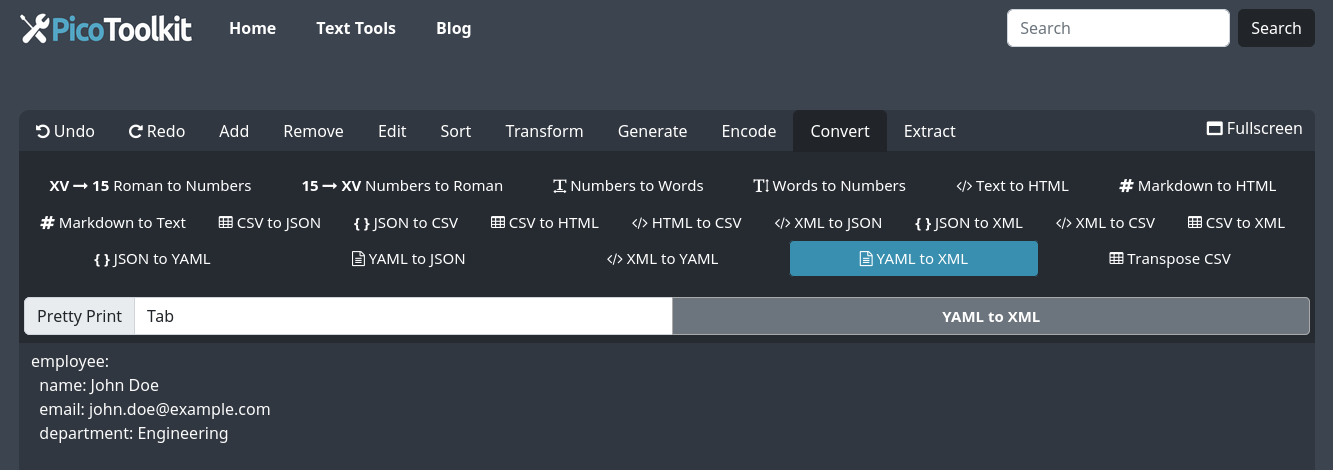
Convert YAML configuration (key: value) files into well‑formed XML. Paste a valid YAML mapping (supports multilevel mappings / nested keys), click Convert → YAML to XML, and copy the resulting XML. Note: YAML sequences (lists) are not supported by this tool.
How to use
- Paste your YAML (must be valid YAML mapping / config) into the editor.
- Choose Convert → YAML to XML.
- Copy the generated XML from the editor (use the editor’s copy action) or continue with other converters.
Mapping rules — exact behavior
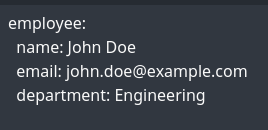
- Input model: the tool expects YAML as mappings (key: value) and nested mappings. Example supported structure:
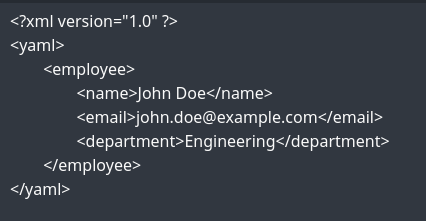
parent:with nested keys underneath. - Mapping → element: each YAML mapping key becomes an XML element with the key name. The key name is used verbatim where valid XML names; invalid XML name characters should be sanitized before conversion.
- Nested mappings → nested elements: nested YAML mappings produce nested child elements in the same hierarchy.
- Scalars → text nodes: scalar values (strings, numbers, booleans) are emitted as element text content. Special XML characters are escaped so output is well‑formed XML.
- Sequences / lists: YAML sequences (dash-prefixed lists) are not handled. Example NOT supported:
items: - itemA - itemB. If your YAML contains sequences the conversion will not produce the intended XML — convert lists to mappings first or pre-process the YAML. - Aliases / anchors: YAML anchors and aliases are not expanded or specially handled; they may lead to incorrect output or errors.
- Validation: the YAML input must be syntactically valid YAML for conversion to proceed. Invalid YAML returns an error message instead of XML.
Examples — exact YAML → XML
Simple mapping
YAML:
app:
  name: MyApp
  port: 8080

XML:
<app>
  <name>MyApp</name>
  <port>8080</port>
</app>
Multilevel nesting
YAML:
server:
  host: example.com
  tls:
    enabled: true
    cert: /path/to/cert.pem

XML:
<server>
  <host>example.com</host>
  <tls>
    <enabled>true</enabled>
    <cert>/path/to/cert.pem</cert>
  </tls>
</server>
Notes: the converter escapes special XML characters (for example, & → &) so output is safe to parse as XML.
Error handling & validation
- If the YAML is syntactically invalid the tool reports a parsing error and does not produce XML.
- If the YAML contains unsupported constructs (sequences, anchors, merge keys) the output may be incomplete or incorrect — pre-process those constructs before conversion.
- For deterministic results, ensure keys are valid XML names; otherwise sanitize keys (replace spaces/special characters) before converting.
Options & limitations
- Supported input: YAML mappings with nested mappings. Sequences (lists) are unsupported.
- Aliases/anchors are not expanded.
- The tool produces escaped, pretty‑printed XML. There is no namespace or attribute mapping option — every key becomes an element by default.
- YAML must be valid; large inputs are subject to browser/memory limits.
Tips & workflows
- Convert complex data via JSON if needed: YAML → JSON then JSON → XML if you need alternative sequence handling.
- Pre-clean keys: use Pattern Extractor or Find & Replace to rename keys that are not valid XML names.
- Strip comments or extraneous content first with the editor, then convert to XML.
FAQ
Does the tool convert YAML lists (sequences) into repeated XML elements?
No. Sequences (dash-prefixed lists) are not supported. Convert lists into mapping form or use a YAML→JSON→XML workflow for custom handling.
Are YAML anchors and aliases supported?
No. Anchors/aliases are not expanded by this converter and may cause errors or incorrect output.
What happens with invalid YAML?
The tool requires valid YAML. Invalid input will produce a parsing error and no XML output. Fix YAML syntax and try again.
Related tools
- XML to YAML — reverse conversion.
- YAML to JSON — useful intermediate for advanced conversions.
- JSON to YAML — related format converter.
- Pattern Extractor — pre-process keys or insert wrappers before conversion.