
HTML to Markdown Converter
Table of Contents
- What this HTML to Markdown tool does
- How to use the HTML to Markdown converter
- Examples: HTML input and Markdown output
- Basic content
- HTML table to Markdown
- Use cases
- Blog posts and CMS content
- Developer documentation and README files
- Cleaning up HTML emails and templates
- Note-taking, archiving and knowledge bases
- FAQ
- Is this HTML to Markdown converter free to use?
- Can I convert a full HTML page or file to Markdown?
- Does it support tables, images and links?
- Is my HTML content stored anywhere?
- What is the difference between HTML to Markdown and Markdown to HTML?
- Can I bulk convert multiple HTML files to Markdown?
- Related tools
Transform HTML to Markdown in one click
Use this HTML to Markdown converter to turn raw HTML code into clean, readable Markdown in seconds. Paste your HTML, click the button, and copy the Markdown result into your editor, docs or Git repo.
The tool is handy for developers, technical writers, bloggers and anyone who wants to convert HTML to Markdown online without installing extra software. It is part of the friendly PicoToolkit collection of text tools.
What this HTML to Markdown tool does
This online HTML to Markdown converter takes any valid HTML snippet or full HTML document and turns it into Markdown syntax. Headings, paragraphs, lists, links, images and even tables are mapped to their Markdown equivalents whenever possible.
It works well when you:
- want to convert HTML to MD for README files or developer docs,
- need a simple HTML to Markdown workflow for blogs or CMS content,
- copy HTML from a page and quickly turn that HTML content to Markdown,
- paste a whole HTML file to Markdown instead of rewriting it by hand.
If you already have Markdown and need HTML, use the Markdown to HTML converter instead. When you only want to remove formatting and tags, Strip HTML is a better fit.
How to use the HTML to Markdown converter
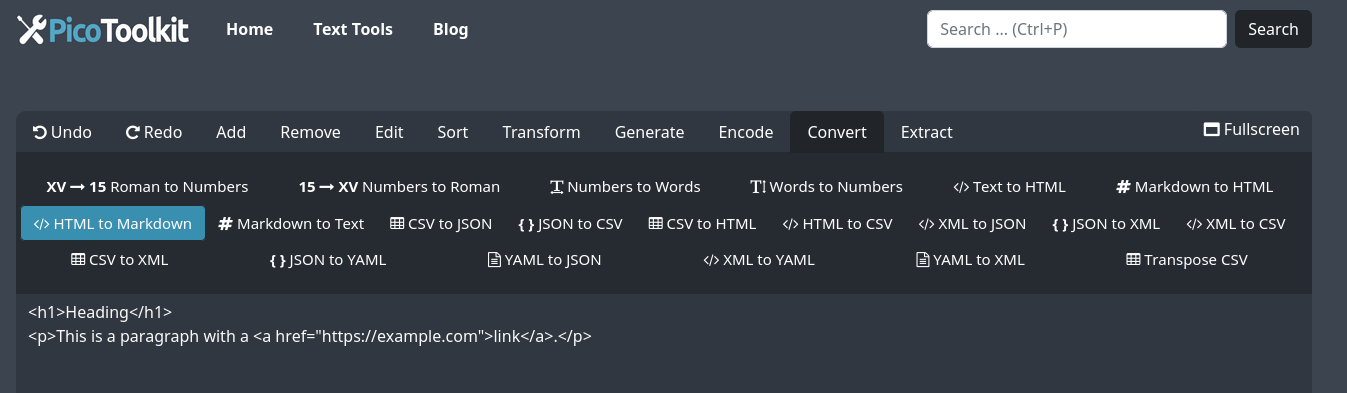
- Copy the HTML you want to convert – a snippet, a block of content or a full webpage.
- Paste it into the input area above the button.
- Click the convert button to run the HTML markdown converter online.
- Review the output Markdown and make quick edits if needed.
- Copy the Markdown and paste it into your editor, wiki, CMS or Git repository.
The process is fast and does not require you to remember HTML tags or Markdown syntax. It is an online HTML to Markdown converter, so you can use it from any browser.
Examples: HTML input and Markdown output
Basic content
HTML input:
<h2>Welcome to PicoToolkit</h2>
<p>This is a short <strong>HTML to Markdown</strong> demo.</p>
<ul>
  <li>Convert headings</li>
  <li>Convert lists</li>
  <li>Convert links and images</li>
</ul>
Markdown output:
## Welcome to PicoToolkit

This is a short **HTML to Markdown** demo.

- Convert headings
- Convert lists
- Convert links and images
HTML table to Markdown
HTML input (table):
<table>
  <tr><th>Language</th><th>Syntax</th></tr>
  <tr><td>HTML</td><td>Tags</td></tr>
  <tr><td>Markdown</td><td>Plain text</td></tr>
</table>
Markdown output:
| Language | Syntax    |
|----------|----------:|
| HTML     | Tags      |
| Markdown | Plain text |


Screenshots above show a simple block of HTML and the Markdown generated by the converter.
Use cases
Blog posts and CMS content
Many blogs and static site generators prefer Markdown. If you get content as HTML (for example from an editor or another site), this tool lets you quickly convert that webpage to Markdown and paste it into your CMS without manual rewriting.
Developer documentation and README files
Git repositories, API docs and internal wikis often use Markdown. Paste HTML from design tools, prototypes or old documentation and turn it into Markdown that fits your current workflow.
Cleaning up HTML emails and templates
Need a simpler version of a HTML email for documentation or issue tracking? Convert the email HTML to Markdown, keep the content and structure, and drop the layout noise.
Note-taking, archiving and knowledge bases
When you save content in Obsidian, Notion, a Markdown-based note app or a knowledge base, it is often easier to store it as Markdown. This tool turns copied HTML content to Markdown so your notes stay compact and easy to edit.
FAQ
Is this HTML to Markdown converter free to use?
Yes. The HTML to Markdown converter on PicoToolkit is free to use directly in your browser for normal, everyday work. You do not need an account or subscription to convert HTML to Markdown online.
Can I convert a full HTML page or file to Markdown?
Yes. As long as you can copy the HTML source, you can paste a full HTML file to Markdown here. Very large pages may take a bit longer, but the tool is designed to handle full documents as well as small snippets.
Does it support tables, images and links?
Yes. The converter tries to keep your structure intact: headings, paragraphs, lists, links, images and many tables are mapped to their Markdown versions. It works well as a quick HTML table to Markdown helper, although extremely complex layouts may need a small manual touch-up.
Is my HTML content stored anywhere?
The tool is built as a simple in-browser utility for quick, one-off conversions. It is not meant to permanently store or share your HTML or Markdown. For highly sensitive data, consider using local tools or anonymising your content first.
What is the difference between HTML to Markdown and Markdown to HTML?
This page converts HTML code to Markdown. If you already have Markdown and want to generate HTML for your website, use the dedicated Markdown to HTML converter. Both tools work together, but each solves a different step in your workflow.
Can I bulk convert multiple HTML files to Markdown?
This online tool is designed for one conversion at a time in your browser, not full bulk HTML to Markdown processing. For true batch conversion you will usually want a script or command-line tool, but many users still paste several files one after another into this page when they need a quick fix.
Related tools
- Markdown to text converter – strip Markdown formatting and keep only plain text.
- Markdown to HTML converter – generate clean HTML from existing Markdown content.
- Strip HTML – remove all HTML tags and leave only readable text without Markdown.
- Escape HTML – turn HTML characters into escaped entities for safe display in code examples.
- Unescape HTML – convert escaped HTML entities back to normal characters.
Combined with these related tools, the PicoToolkit HTML to Markdown converter gives you a flexible way to move between HTML, Markdown and plain text without losing control over your content.