
Random Email Generator
Table of Contents
- Generate bulk test emails — Random Email Generator
- How to use
- Behavior & options
- Examples — sample outputs
- Export & common workflows
- Limits & performance
- Tips & best practices
- FAQ
- How many emails can I generate at once?
- Are generated addresses real inboxes?
- Can I get passwords alongside generated emails?
- Will the tool produce duplicate addresses?
- Related tools
Streamlining Testing with the PicoToolkit
Generate bulk test emails — Random Email Generator
Generate up to 2,000 unique, syntactic test email addresses in seconds. Choose count and a custom domain, click Generate → Emails, then copy or append the results to the editor for use in QA, load testing, or validation. Generated addresses are synthetic test data (not provisioned inboxes) — do not use for unsolicited messaging.
How to use
- Open Generate → Emails in the editor toolbar.
- Set the number of addresses (max 2000), choose or enter a custom domain, and select any available pattern options.
- Click Generate emails. Results appear in the generation toolbar or the editor; use the editor copy action to export or continue processing.
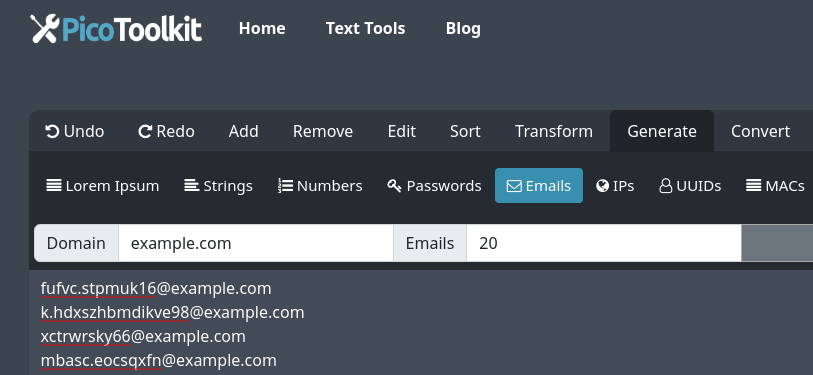
Behavior & options
- Maximum per run: 2000 addresses.
- Uniqueness: addresses generated in a single run are unique. The tool does not guarantee uniqueness across separate runs or sessions.
- Domains: you can specify a custom domain for all generated addresses. The tool only generates syntactically valid addresses (it does not provision mailboxes).
- Patterns: the generator produces varied local‑parts to stress-test validation logic. Use name-based inputs (paired with the Random Name Generator) if you need realistic local‑part patterns.
- Output location: generated addresses are returned as plain text (one address per line) in the editor area or generation panel — copy, append, or further process them in the editor.
- Privacy & deliverability: these emails are synthetic test data. Do not send bulk unsolicited email to addresses generated here; the tool does not verify mailbox existence or deliverability.
Examples — sample outputs
Example — 5 emails (example.com):
[email protected]
[email protected]
[email protected]
[email protected]
[email protected]
Example — custom domain (test.local):
[email protected]
[email protected]
[email protected]
[email protected]
[email protected]
Note: samples are illustrative. Actual local‑parts and patterns vary to exercise validators and storage systems.
Export & common workflows
- Quick CSV: generate → Copy to clipboard → paste into the editor → use Convert Newline to Comma or other converters to format CSV/columns.
- Pair with passwords: generate emails here and produce passwords with Random Password Generator; then combine (paste both lists into a CSV using editor actions).
- Create realistic user lists: Random Name Generator → derive name-based emails → generate emails → append UUIDs from Random UUID Generator for IDs.
- Ensure uniqueness across lists: after generation run Remove Duplicates to dedupe if merging multiple runs.
Limits & performance
- Per-run hard limit: 2000 addresses. Very large runs may be constrained by browser memory and device performance.
- Generation is syntactic only — the tool does not create or verify real mailboxes, check MX records, or perform SMTP validation.
Tips & best practices
- Use a test-only domain (e.g., example.test or a disposable internal domain) to avoid accidentally targeting real users.
- For structured test data, generate emails and passwords separately, then merge into a CSV with the editor or converters.
- To stress validation, combine varied local‑parts (dots, underscores, numeric suffixes) by running multiple pattern options or combining outputs.
FAQ
How many emails can I generate at once?
Up to 2000 addresses per run.
Are generated addresses real inboxes?
No. Addresses are synthetic and syntactically valid only. The tool does not provision mailboxes or verify deliverability.
Can I get passwords alongside generated emails?
Not in this tool. Use the Random Password Generator to create passwords and combine them with the generated emails in the editor.
Will the tool produce duplicate addresses?
Addresses within a single generated list are unique. If you merge outputs from multiple runs, run Remove Duplicates to ensure uniqueness.
Related tools
- Realistic Random Names Generator — create name-based local‑parts.
- Random Password Generator — create passwords to pair with emails.
- Random String Generator — build custom local‑parts.
- Random UUID Generator — attach unique IDs to test accounts.
- Convert Newline to Comma — quickly turn generated lists into CSV lines.
- Remove Duplicates — dedupe merged lists.