
Morse Code Decoder and Encoder
Table of Contents
- Morse Code Decoder & Encoder — decode or encode text instantly
- How to use
- Supported input format
- Morse Code Translation Table
- Examples
- Behavior & limits
- Tips & edge cases
- FAQ
- Can this tool decode Morse without spaces between letters?
- Which symbols are accepted for dots and dashes?
- Does it support audio or image decoding?
- How do I mark word boundaries?
- Are punctuation marks supported?
- Related tools
Morse Code Decoder & Encoder
Morse Code Decoder & Encoder — decode or encode text instantly
Paste Morse (dots and dashes) or plain text and convert between text and Morse code in seconds. The tool accepts dot (.) and dash (-) as the only signal symbols. Letters must be separated by spaces; words may be separated with a slash (/). This is a text-only tool (no audio or image decoding).
How to use
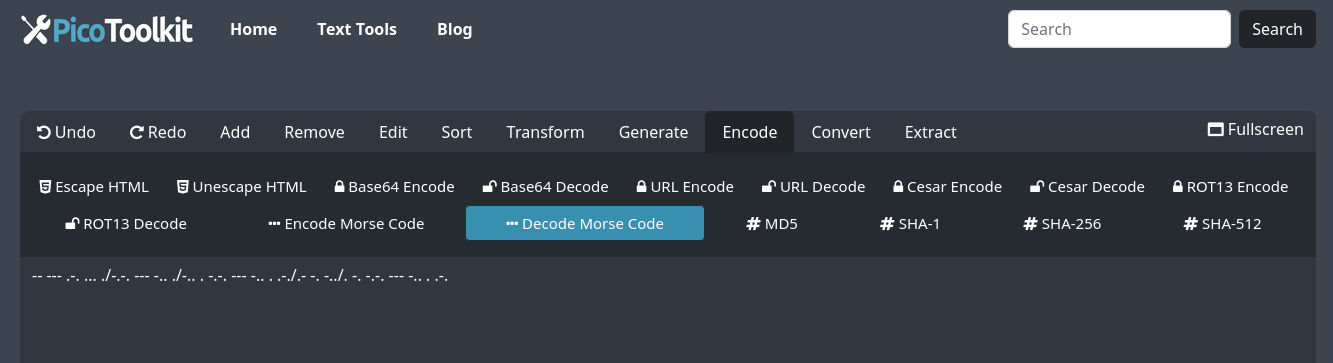
- Paste Morse code (using
.and-) or plain text into the editor. - Choose Encode → Encode to Morse Code to convert text → Morse, or Encode → Decode to Morse Code to convert Morse → text.
- Results replace the editor content in place; use the editor copy action to export the output.
Supported input format
- Signal symbols: dot (
.) and dash (-) only. Other dot/dash-like glyphs are not supported. - Letter separation: a single space between Morse letters is required. Example:
... --- ...for SOS. - Word separation: use a slash (
/) between words (optional but common). Example:... --- ... / .... . .-.. .--.. - Text-only: the tool accepts only textual Morse representations. It does not decode audio, images, or other media.
Morse Code Translation Table
| Char | Code | Char | Code | Char | Code | Char | Code |
|---|---|---|---|---|---|---|---|
| A | .- | H | .... | O | --- | V | ...- |
| B | -... | I | .. | P | .--. | W | .-- |
| C | -.-. | J | .--- | Q | --.- | X | -..- |
| D | -.. | K | -.- | R | .-. | Y | -.-- |
| E | . | L | .-.. | S | ... | Z | --.. |
| F | ..-. | M | -- | T | - | 1 | .---- |
| G | --. | N | -. | U | ..- | 2 | ..--- |
| 3 | ...-- | 4 | ....- | 5 | ..... | 6 | -.... |
| 7 | --... | 8 | ---.. | 9 | ----. | 0 | ----- |
Examples
Standard spaced Morse → text
Input:
... --- ... / .... . .-.. .--.

Output:
SOS HELP
Encode text → Morse
Input:
HELLO WORLD

Output:
.... . .-.. .-.. --- / .-- --- .-. .-.. -..
Run-together code (not supported)
Input:
...---...

Note:
Letters must be separated by spaces. Run-together code without spaces cannot be decoded reliably by this tool.
Behavior & limits
- Spaces between letters are required. Missing spaces prevent correct decoding.
- Only
.and-are used as signal symbols. Non-standard glyphs are ignored or treated as invalid. - Words may be separated by a slash (
/); optional multiple spaces are tolerated but single-letter spacing is expected. - Punctuation and prosigns supported are those in the translation table or common Morse conventions; uncommon prosigns may not be recognized.
- Text-only: the tool does not accept audio or image inputs and cannot decode sound or pictures.
- Results replace the editor content; use the editor undo/redo to revert if needed and the editor copy action to export results.
Tips & edge cases
- If you receive run‑together code, try to insert spaces between letters (if you know approximate letter boundaries) or use a pattern-based approach with Pattern Extractor.
- When pasting content from a web page, first run HTML Stripper to remove tags that might break spacing.
- For learning, use short examples and verify letter spacing; multi-word messages are easiest when words are separated by
/. - Use the editor’s copy action to move results into documents, code, or messages quickly.
FAQ
Can this tool decode Morse without spaces between letters?
No. This tool requires spaces between letters. It does not attempt heuristic spacing or run‑together decoding.
Which symbols are accepted for dots and dashes?
Only the ASCII period (.) for dot and the ASCII hyphen (-) for dash are accepted. Other symbols or emoji are not supported as signal symbols.
Does it support audio or image decoding?
No. This is a text-only encoder/decoder. For audio or image decoding you must use dedicated audio‑to‑text or OCR/image tools outside PicoToolkit and paste the resulting dot/dash text here.
How do I mark word boundaries?
Use a slash (/) between words (for example: .... . .-.. .-.. --- / .-- --- .-. .-.. -.. for "HELLO WORLD"). Multiple spaces are tolerated but a single space is required between letters.
Are punctuation marks supported?
Common punctuation with standard Morse representations (period, comma, question mark, etc.) are supported according to the translation table and conventions; very rare prosigns may not be recognized.
Related tools
As part of PicoToolkit this tool is complemented by converters such as CSV to HTML table, HTML table to CSV, CSV to JSON, JSON to CSV, and XML to CSV. Use HTML Stripper to clean pasted HTML before decoding Morse.