
Random Date Generator
Table of Contents
- Generate up to 2000 random dates online — multiple formats
- How to use
- Available formats
- Examples (copy-ready)
- Common use cases
- Tips & edge cases
- Related tools
- Quick troubleshooting
- FAQ
- Can I generate datetimes or include a timezone?
- How can I export generated dates?
- Are generated dates guaranteed unique?
- What is the maximum number of dates I can generate in one run?
Generate up to 2000 random dates online — multiple formats
Generate up to 2000 random dates online — multiple formats
Quickly create lists of random dates for testing, datasets and scheduling simulations. The generator produces plain text lists you can copy to clipboard and paste into test scripts, CSVs or databases.
How to use
- Open the tool from the menu: Generate → Dates.
- Select the date format and set the date range or parameters in the toolbar.
- Click Generate dates, then use the page Copy control to copy the results to clipboard (clipboard export only).
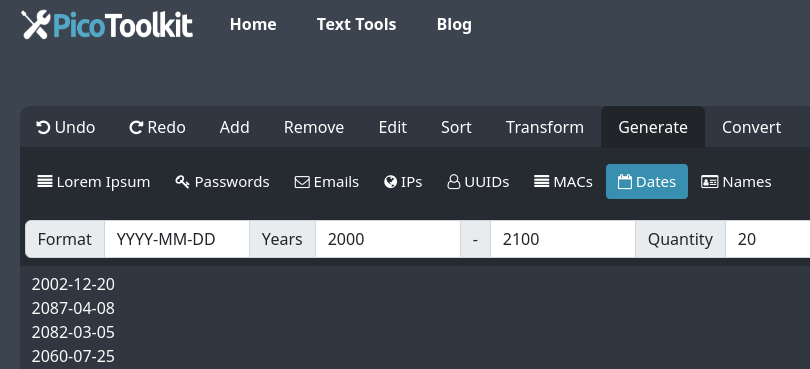
Available formats
The generator supports common date and datetime formats. Choose one before generating:
- YYYY-MM-DD
- YYYY-MM-DD HH:mm:ss
- MM/DD/YYYY HH:mm:ss
- MM-DD-YYYY hh:mm:ss AM/PM
- MMM DD, YYYY hh:mm:ss AM/PM
- MM/DD/YYYY
- HH:mm:ss AM/PM
- HH:mm:ss
Examples (copy-ready)
Sample outputs you can generate and copy:
2024-01-15
2024-01-15 14:30:00
01/15/2024 02:30:00 PM
Common use cases
- Populate test databases and CSV fixtures with realistic random dates.
- Stress-test scheduling, booking and expiration logic with bulk random dates.
- Combine with other PicoToolkit generators to create full datasets (names, emails, IPs).
Tips & edge cases
- Bulk limit: generate up to 2000 dates per run. For larger datasets, create multiple batches and merge locally.
- Time components: several formats include time (HH:mm:ss). The tool does not assign timezones — it outputs the chosen string format only.
- Uniqueness: dates are generated purely at random; duplicates are possible. Use Remove Duplicates after copying if you require unique entries.
- Leap years & edge dates: the generator will produce valid calendar dates within your selected range, including leap-day when applicable.
- Reformatting: to convert the copied list into CSV, JSON or a different separator, use helpers like Convert Newline to Comma or CSV to JSON.
Related tools
Combine dates with other fixture data or post-process the list:
- Lorem Ipsum
- String Generator
- Email Generator
- Random Numbers
- IP Generator
- Names Generator
- Post-process: Remove Duplicates, Convert Newline to Comma, CSV to JSON
Quick troubleshooting
- If a target system rejects a date, confirm the expected format (for example, YYYY-MM-DD vs MM/DD/YYYY) and regenerate in that format.
- If you see duplicate lines, run the copied list through Remove Duplicates.
- For bulk imports, convert the newline-separated list to CSV or JSON before importing.
FAQ
Can I generate datetimes or include a timezone?
The generator supports datetime formats that include time (for example, "YYYY-MM-DD HH:mm:ss" or "MM/DD/YYYY HH:mm:ss"). It does not apply or store timezone information — outputs are plain formatted strings suitable for tests and imports.
How can I export generated dates?
Export is clipboard-only: use the page Copy control to copy the generated list. For file exports or different separators, paste the copied data into your editor or use PicoToolkit helpers like Convert Newline to Comma or CSV to JSON to prepare importable files.
Are generated dates guaranteed unique?
Dates are produced purely at random and duplicates can occur. If you require a unique date list, copy the output and run it through the Remove Duplicates tool before using it in tests or imports.
What is the maximum number of dates I can generate in one run?
The generator creates up to 2000 random dates per generation. For larger datasets, generate multiple batches and combine them locally.
Random date generator online — fast bulk date generation (up to 2000) in multiple formats (YYYY-MM-DD, MM/DD/YYYY, ISO datetime). Copy to clipboard and paste into scripts, CSVs or test data.