
Random Number Generator
Streamlining Fixtures Preparation with PicoToolkit
Generate bulk random numbers
Quickly generate up to 2,000 random numbers (integers or decimals) within a custom range. Ideal for tests, simulations, dataset samples, and bulk CSV imports.
How to use
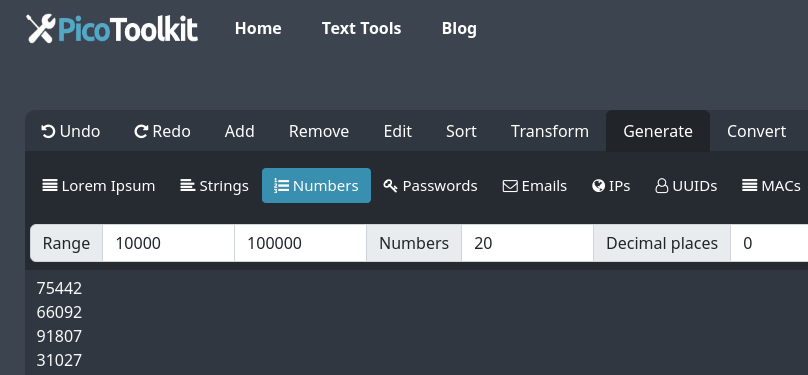
- Open the menu: choose Generate → Numbers.
- Adjust parameters in the toolbar: minimum, maximum, quantity (up to 2000) and decimal precision.
- Click the Generate numbers button, then copy or export the results for your workflow.
Common use cases
- Software testing — feed randomized numeric input to algorithms and QA suites.
- Data science & research — create synthetic numeric datasets for modeling and simulations.
- Bulk imports — produce sample numeric columns for spreadsheets or CSV test files.
- Education — generate practice problems and examples with controlled ranges and precision.
Examples
- 10 integers from 1 to 100:
34, 2, 87, 56, 19, 100, 73, 8, 41, 60 - 5 decimals from 0 to 1 (2 dp):
0.42, 0.07, 0.88, 0.13, 0.61 - Padded IDs (generate numbers then pad):
0001, 0002, 0003, 0004
Tips & edge cases
- Max items: You can generate up to 2,000 numbers per batch.
- Uniqueness: The generator does not guarantee unique values. To make a list unique, run the output through Remove Duplicates.
- Leading zeros / padding: For fixed-width IDs or leading zeros, generate the numbers then use StrPad to add padding.
- Alphanumeric values: This tool produces numeric values only. For letters or mixed strings use Random String Generator or Random Password Generator.
- Post-process workflows: Combine generated numbers with UUIDs, emails or dates to build full test datasets.
Related tools
Use alongside other PicoToolkit generators and helpers to build realistic datasets:
When combined with other fixtures generators available at PicoToolkit, like the email, UUID, random string, MAC numbers, lorem ipsum, passwords, IP, dates, and realistic names, the Random Number Generator significantly enhances the capability to create comprehensive and realistic datasets.
This synergy allows for a more robust testing environment, mimicking real-world scenarios more closely and ensuring applications are thoroughly vetted for any potential issues.
- Remove Duplicates — make lists unique after generation.
- StrPad — add leading zeros or fixed-width formatting.
- Sort Numbers — order generated values.
- List Randomizer — shuffle if you need additional randomness.
FAQ
Is each value guaranteed to be unique?
No. The generator does not guarantee uniqueness. To remove duplicates, run the output through Remove Duplicates.
Can I generate padded numbers with leading zeros?
Yes. Generate the numeric list here, then use StrPad to add leading zeros or fixed-width formatting.
Can I export results to CSV?
Copy the generated list and paste it into a spreadsheet, or save it as a CSV file using your editor. For column-ready output, generate one value per line and import as a single-column CSV.
How do I get alphanumeric codes (letters + numbers)?
Use Random String Generator or Random Password Generator for mixed letter/number output.
SEO keywords: random number generator, generate random numbers, bulk random numbers, random digits generator, generate random integers, generate random decimals, random numbers CSV.