
Random MAC Addresses Generator
Generate random MAC addresses for testing — up to 2000 at once
Generate random MAC addresses for testing — up to 2000 at once
Quickly create lists of dummy Media Access Control (MAC) addresses for network simulation, QA and security testing. The tool produces a plain list you can copy to clipboard for immediate use in scripts, test data or device labs.
How to use
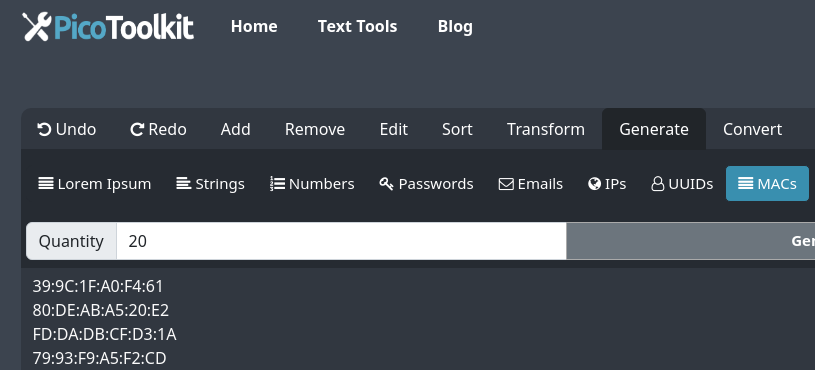
- Open the tool from the menu: Generate → MACs.
- Adjust any available parameters in the toolbar (count, etc.), then click Generate MACs.
- Use the page Copy control to copy the generated list to clipboard. (The tool supports clipboard export only — no direct file download.)
- Paste the copied list into your test scripts, CSV, or device configuration files.
Common use cases
- Network simulation: populate virtual switches, emulators and testbeds with unique-looking device addresses.
- Security testing: exercise MAC-based filters, access controls and detection rules with synthetic device identifiers.
- Software & hardware QA: feed monitoring and provisioning systems with dozens or thousands of addresses for load and validation tests.
Examples (copy-ready)
Sample MAC addresses (colon-separated):
00:1a:2b:3c:4d:5e
a4:5b:6c:7d:8e:9f
de:ad:be:ef:00:01
Use the copy control to paste these or your generated list directly into tools and scripts.
Tips & edge cases
- Bulk limit: the generator can produce up to 2000 addresses in one request. For larger datasets, generate multiple batches and combine them locally.
- Uniqueness: generated addresses are random. If strict uniqueness is required, verify the list locally after copying (for example, using a simple de-duplication step in your editor or script).
- Device-specific needs: some devices expect certain OUI/vendor prefixes. The generator creates generic test MACs — if you need vendor-specific OUIs, add them to your list after generation.
- Formatting: if you need a different separator or case, transform the copied list with a local text tool (see Related tools below).
- Automation: paste copied MACs into your deployment scripts or CSV templates for bulk provisioning or simulation runs.
Safety & acceptable use
- Use generated MACs for testing, simulation and development only. Do not use them to impersonate devices, bypass network controls or for any illegal activity.
- Generated addresses are synthetic and intended to populate labs and test environments — treat them as fixture data, not real hardware identifiers.
Related tools
Combine MAC lists with other PicoToolkit generators to build realistic test datasets:
- Lorem Ipsum for dummy content in documentation or UIs
- Random Numbers for numerical test fields
- IP Generator for paired IP + MAC test data
- Realistic Names Generator for associating devices with identities
- String Generator for arbitrary test values
- Email Generator for simulated user accounts
- Text helpers: Remove Duplicates, Convert Newline to Comma or CSV to JSON to reformat copied lists for tooling and imports.
Quick troubleshooting
- If copied list contains duplicates, run a local de-duplication (tools like "Remove Duplicates" can help).
- If a target system rejects addresses, confirm that the format and any required vendor OUI match the device expectations.
- For repeated test runs, label batches or append an identifier to avoid accidental reuse of the same data in production-like environments.
Random MAC address generator — fast, online bulk MAC address generation for testing and simulation. Use the copy control to paste results into scripts or imports. Maximum 2000 addresses per generation.